Now
Compatible with macOS 10.12, Sierra
What is Scannerz for Mac OS X?
Scannerz for Mac OS X is a set of tools designed
to help you identify and solve hardware and software problems on
your system. The package consists of Scannerz, Performance
Probe 2, FSE or FSE-Lite, and Phoenix. We
also have a basic package named Scannerz Lite which is a
simplified version of Scannerz and will be described
later.
Scannerz, the primary tool in the package, can
evaluate internal and external hard drives and SSDs, the system
bus, the system RAM, as well as all drive interconnections. With
Scannerz, you can do the following:
- Detect bad sectors/blocks on a hard drive or SSD - Nearly every drive testing tool on the market has this capability, so of course Scannerz and Scannerz Lite do as well. Even if your system doesn't appear to have problems, doing a scan on the drive or SSD once a month may allow you to catch problems before they become serious. If you have problems with a hard drive or SSD, Scannerz will identify it and tell you how severe the problems are.
- Detect weak sectors on a hard drive - Scannerz
and Scannerz Lite are the only commercially available
tools on the market with this capability. A weak sector
differs from a bad sector in that it can still be read, but
only with great difficulty. The presence of weak sectors often
lead to the infamous "spinning beach balls" associated with
delays, but an error is never logged or identified by the
system because the operation eventually succeeds. For this
reason, weak sectors can be more annoying than bad sectors. Scannerz
is the only tool commercially available that can detect this
and make it clear how they're impacting your system.
- Isolate internal and external cable problems - This is another feature other testing products on the market don't have. Put Scannerz into its Diagnostic Mode and test the interface on a volume. If there are problems, Scannerz will catch them. Diagnostics Mode tests are not available with Scannerz Lite.
- Identify emerging system or drive related performance problems before they become serious - Another feature Scannerz uses is historical drive analysis. When a hard drive or SSD is initially tested, Scannerz stores tons of performance data on the drive, and over the life of the drive it compares current profile data with the original data. If a marked difference exists, there's probably something going wrong, and Scannerz will tell you about it.
- Isolate certain logic board faults associated with the computers I/O subsystem - Unlike other tools on the market a combination of tests using Scannerz can reveal existing or emerging emerging problems with the CPU, RAM, or system bus. Unfortunately, if errors are detected here it usually means the logic board has problems, but at least you won't be wasting your time replacing cables or buying new hard drives or SSDs only to find the same problems still exist.
- Automatically diagnose problems with Scannerz Diagnostics Mode - With Scannerz Diagnostics Mode, tests are configured via a simple setup procedure and then the tests are started. Scannerz does the rest! If errors or warnings have been detected during any regular tests, this mode will analyze them and tell them what the problem is.
- Test when you want to - Scannerz allows you to start, stop, and resume a test when you want to, while other products on the market require uninterrupted test time to test a drive's integrity. If the drive is big, this may tie your system down for hours. If you have a big, slow backup drive with terabytes of data on it, do you really want to tie your system up for hours on end just to evaluate the drive? With Scannerz you can test your drive in separate sessions, over lunch hours for example, and start, stop, and resume them at your convenience. There's no longer any need for obtrusively tying the system up for hours on end any more like other products force you to do.
- Scannerz is easy to use - All versions of Scannerz
were designed to be easy to use. All you need to do to use it
is click on a drive or volume you wish to evaluate and start a
test. During the testing process, Scannerz will be
tracking more than hard drive or SSD data, it will be making
other measurements on your system to help identify other
problems, such as cable, RAM, and system bus or CPU problems.
If problems exist, they may be easily and thoroughly evaluated
using Scannerz Diagnostics Mode. In Diagnostics
Mode, Scannerz can run tests on the drive or other
system components to help you identify the root cause of the
problems.
Aside from detecting existing problems with a system, using the
product once a month on a system that appears to be in good
working order may very well identify problems that are just
beginning to emerge.
Click HERE
to see a tutorial on Scannerz basic operation.
Click HERE
to learn more about Scannerz advanced testing
capabilities. To see some screenshots of Scannerz in
use, click on the camera icon below.

Other Products in this Package:
The other products in the Scannerz package are Performance
Probe 2, FSE or FSE-Lite, and Phoenix.
Each of these may be purchased as stand alone packages, but they
are all included in the standard Scannerz packages (not
Scannerz Lite).
Performance Probe 2 can help isolate problematic
applications and identify excessive drive and network use. Many
times when problems occur, they aren't related to hardware at
all but they have symptoms which act like drive or system
problems. This is why this application is included in the
package. Performance Probe 2 continually monitors the
system and displays basic system resource consumption in a small
window. If the system starts to show signs of problems, the user
can click on a button which will allow the user to monitor
memory and CPU consumption, system loading, and graphically
depict network and drive use. Click HERE
to learn more about Performance Probe 2.
FSE or FSE-Lite can identify
the sources of excessive drive use and monitor drive activity. FSE
is configurable, whereas FSE-Lite is not. Aside from
identifying which applications are "hitting" the drive, both can
log drive activity when problematic applications, such as
malware or adware are installing themselves or making
modifications to a system. Click HERE
to learn more about FSE and FSE-Lite.
Phoenix is a tool for creating emergency boot
volumes from an existing system, attempting file recovery of
damaged files from a drive, and can perform basic cloning
operations. The emergency boot volume created by Phoenix,
which we call a Phoenix Boot Volume, can be used to boot
the system for testing, re-install the operating system, and
help try to recover data from a failed or failing drive in the
event the disk has problems or bad files on it. It's basic
cloning capabilities may be used to try and copy data from a
damaged drive to a new drive, as well as perform full volume
clones from one drive to another on perfectly good drives of
SSDs. Click HERE to
learn more about Phoenix.
Available Scannerz Packages:
Scannerz variants come in the following three
packages:
- Scannerz with Performance Probe 2, Phoenix, and FSE or Mac OS X
- Scannerz with Performance Probe 2, Phoenix, and FSE-Lite for Mac OS X
- Scannerz Lite
The Scannerz packages that include FSE or FSE-Lite,
Performance Probe 2, and Phoenix, are
referred to as the fully featured versions of the product,
whereas Scannerz Lite is a less sophisticated
subset of the fully featured version. Performance Probe 2,
Phoenix, and FSE can be purchased as standalone
products and more detail on them may be obtained by visiting the
web page associated with each product. Simply go to the menu bar
at the top and click on the link associated with each product in
the menu.
Scannerz Lite
Scannerz Lite is a simplified version of Scannerz.
It does not include Performance Probe, FSE/FSE-Lite,
or Phoenix. Scannerz Lite is intended to be
used by someone that simply wants to evaluate their drive and
system to see if there are problems, and if so, take it in for
servicing.
The following table illustrates the differences between Scannerz
and Scannerz Lite, as well as how they compare to other
products on the market. A brief write up underneath the table
spells out the differences.
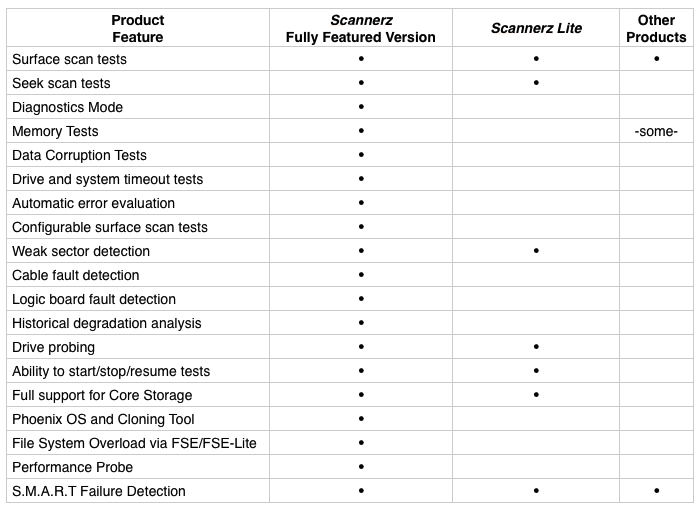
Both Scannerz and Scannerz Lite can detect not
only errors, but timing irregularities. Irregularities often
occur when a drive or a subsystem component is in the process of
developing problems. Scannerz and Scannerz Lite
are the only commercially available tools on the
market with this type of detection capability.
The fully featured release of Scannerz performs drive
profiling, which can help the user clearly identify and head off
problems related to a drive before they become serious by
monitoring the historical performance of the drive and
generating reports at the end of each test to indicate the
current status of the drive. It also has three test modes
named Normal Mode, Diagnostics Mode, and Cursory
Mode. Typically, you click on a few buttons to set up a
test in Normal Mode, and if Scannerz finds
problems or possible developing problems, it quickly evaluates
them using Diagnostics Mode. A Diagnostics Mode
test is fully configurable allowing the user automatically
re-evaluate and thoroughly analyze problems. Both Diagnostics
and Cursory mode tests can be manually configured by the user to
run customized tests and perform advanced troubleshooting if
needed.
Scannerz Lite, on the other hand, is a fairly simple and
straightforward tool. It does a test over an entire drive or
volume, and when complete it simply informs the user what the
status is. There is no option to perform diagnostics or limited
scans over suspected problematic regions, there is no logging
window, and there is none of the drive profiling and analysis
available with the fully featured version of Scannerz.
Scannerz Lite provides a quick, easy, and low cost
solution for someone that simply wants to ensure their system
and drive are operating properly.
System Requirements  Scannerz
and Scannerz-Lite can be run on normally configured
systems using Mac OS X 10.6 (Snow Leopard), 10.7 (Lion), 10.8
(Mountain Lion), 10.9 (Mavericks), 10.10 (Yosemite),
10.11 (El Capitan), and 10.12 (Sierra) using supported
32 or 64 bit Intel processors. Supported drive interfaces
include SATA, IDE, FireWire, PCIe, Thunderbolt, and USB 2.0
(or greater). Both Scannerz and Scannerz-Lite
are fully capable of handling Core Storage components,
including full volume encryption using File Vault
2 where supported by the OS. Additionally, products in the
Scannerz family can handle multi-drive virtual volumes using
Core Storage or Apple RAID on a component basis, and provides
general support for most implementations of hardware RAID, and
limited support for third party software RAID implementations.
Scannerz
and Scannerz-Lite can be run on normally configured
systems using Mac OS X 10.6 (Snow Leopard), 10.7 (Lion), 10.8
(Mountain Lion), 10.9 (Mavericks), 10.10 (Yosemite),
10.11 (El Capitan), and 10.12 (Sierra) using supported
32 or 64 bit Intel processors. Supported drive interfaces
include SATA, IDE, FireWire, PCIe, Thunderbolt, and USB 2.0
(or greater). Both Scannerz and Scannerz-Lite
are fully capable of handling Core Storage components,
including full volume encryption using File Vault
2 where supported by the OS. Additionally, products in the
Scannerz family can handle multi-drive virtual volumes using
Core Storage or Apple RAID on a component basis, and provides
general support for most implementations of hardware RAID, and
limited support for third party software RAID implementations.
Scannerz and Scannerz-Lite will not support any
of the following types of devices:
- USB 1.0 or 1.1 devices, because the devices are so slow.
- Network drives, because they're too susceptible to network and connection problems
- Drives connected via Xsan or SAN, because so few of them are in use on normal systems.
- Optical drives of any type, because optical media itself tends to be the problem, not the drive.
- Very old hard drives using MFM and many SCSI interfaces, because they're rarely used anymore.
None of these devices should stop Scannerz or Scannerz
Lite from operating properly, we've simply decided not
to support them.
Purchasing Scannerz
To purchase one of the Scannerz packages, click on
the Buy Scannerz Now button below.
Prices:
$21.95 For Scannerz Lite
$39.95 For Scannerz with FSE-Lite,
Performance Probe, and Phoenix
$49.95 For a Scannerz with FSE,
Performance Probe, and Phoenix